GTA San Andreas Mobile – Story, Open World, Controls & Complete Guide

GTA San Andreas brings its classic open-world adventure to compatible mobile devices.
GTA San Andreas Mobile remains a popular way to revisit one of Rockstar Games’ most well-known open-world adventures on a phone or tablet. Instead of offering a shortened mobile experience, the game brings the main San Andreas world, missions, characters and exploration to touchscreen devices.
The mobile edition is especially interesting for players who want a complete single-player experience without needing a console or PC. It combines the original game’s large map with controls, visual options and features adapted for mobile hardware.
- Genre: Open-world action adventure
- Main character: Carl “CJ” Johnson
- World: San Andreas
- Major cities: Los Santos, San Fierro and Las Venturas
- Mode: Single-player
- Controls: Touchscreen and supported controllers
- Developer: Rockstar Games
A Tour Through San Andreas
One of the biggest strengths of San Andreas is the size and variety of its world. The game is not built around one small urban area. Players move through several distinctive regions, with busy streets, rural roads, open countryside and large city environments creating a world that feels different as the story progresses.
The three major cities give the adventure plenty of variety. Los Santos provides the early setting for CJ’s return, while San Fierro and Las Venturas introduce different surroundings and new opportunities for exploration.
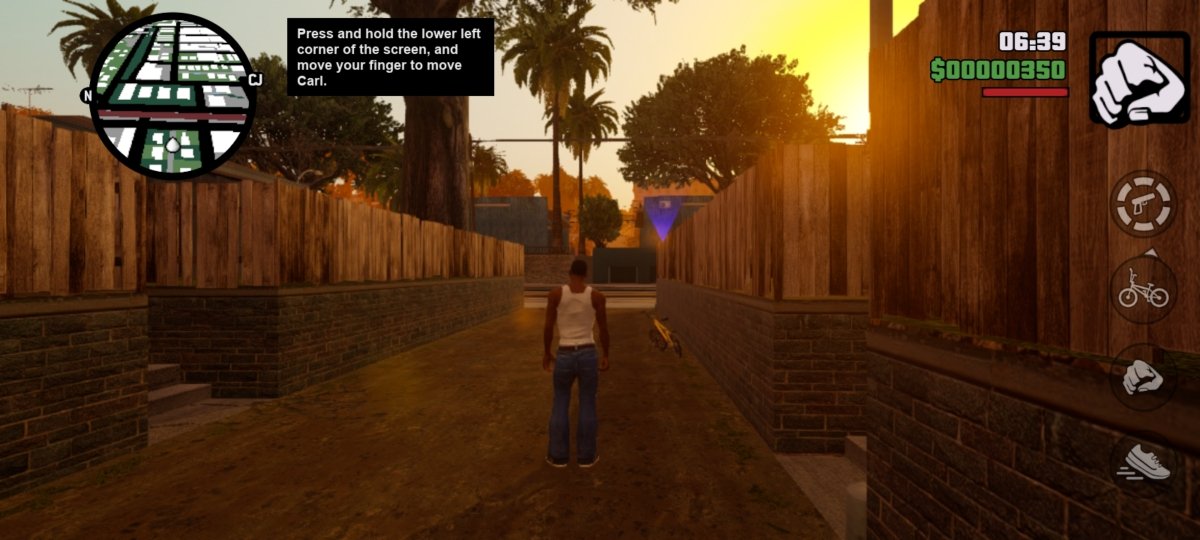
The mobile edition uses an interface built around touchscreen play.
CJ’s Journey Is at the Center of the Game
The player takes control of Carl Johnson, better known as CJ. After being away from Los Santos for several years, he returns home and finds that his family, neighborhood and old connections have changed.
CJ’s return becomes the starting point for a much larger journey. Missions gradually take the player beyond the early parts of Los Santos and into other areas of San Andreas. Along the way, the story introduces new characters, locations and situations that keep the campaign moving forward.
The story is only one part of the experience, however. Players can also leave the main objectives behind for a while and simply explore the world, drive around different areas or experiment with the activities available across the map.
What Makes the Mobile Version Worth Playing?
Moving a large open-world game to a touchscreen is not simply a matter of putting the original software on a smaller display. The mobile release includes several features intended to make the game more practical to play on phones and tablets.
Touch Controls You Can Adjust
Movement, camera control and gameplay actions are handled through an on-screen interface. Players can customize available control options to make the layout more comfortable for their preferred playing style.
Support for Physical Controllers
Players who do not enjoy touchscreen controls can use a compatible Bluetooth or USB controller on supported devices. Physical buttons can be particularly useful during driving and action-heavy sections.
Visual Improvements for Mobile Displays
The mobile release includes visual enhancements intended to make the classic game look better on modern screens. These improvements include changes to lighting, the color presentation and character visuals.
Graphics Options
Available graphics settings can be adjusted depending on the device. This gives players some flexibility when deciding whether they want to prioritize image quality or smoother performance.
Cloud Save Functionality
Cloud saving is available for supported users, making it easier to maintain progress when playing across compatible devices.
How Gameplay Works on a Phone
The core gameplay remains focused on the same combination of missions and free exploration that defines San Andreas. Story objectives provide the main progression, but the open-world design means players are not forced to follow missions every moment.
Driving is another major part of the experience. Vehicles provide a convenient way to move between cities and other parts of the map, while the changing environments make long trips feel different from one area to another.
The touchscreen interface places important actions directly on the display. Once players become familiar with the layout, they can move around, drive, interact with the world and control the camera without needing a physical keyboard or mouse.
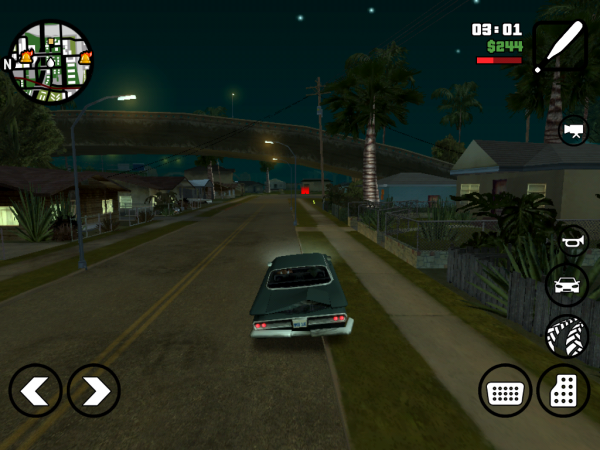
Driving across San Andreas is an important part of exploring the mobile game world.
Three Cities, Different Experiences
San Andreas feels larger than a typical mobile game because its world is divided into several major areas. Each city has its own atmosphere and contributes to the sense of progression throughout the campaign.
- Los Santos: The city where CJ’s journey begins and an important location throughout the story.
- San Fierro: A different urban environment that expands the adventure beyond Los Santos.
- Las Venturas: A visually distinctive city that adds another major region to explore.
Between these major locations, players can also travel through roads and countryside areas. This mixture of environments is one reason the game’s map continues to feel substantial even years after its original release.
Graphics and Performance on Mobile
The appearance of GTA San Andreas Mobile depends partly on the hardware running it. Modern phones and tablets can generally provide a more comfortable experience, while older devices may need more conservative graphics settings.
Keeping the device updated and closing unnecessary background applications can also help when a game feels less responsive. Players should remember that performance can vary considerably between different Android and iOS devices.
How Much Storage Does It Need?
GTA San Andreas is considerably larger than many simple mobile games. Rockstar’s support information lists approximately 2.5 GB of required space for the Android and Amazon Kindle version.
It is sensible to have additional free storage beyond the listed requirement. Your device may need extra room for temporary installation files, updates and normal operating-system activity.
GTA San Andreas APK: What Does It Actually Mean?
The term APK refers to the Android application package format. This is why searches for GTA San Andreas on Android frequently include the word “APK.”
However, not every APK found online is an official copy. Files hosted by unknown websites may be modified, outdated or bundled with unwanted software. For a legitimate installation, the safest approach is to use the official store listing published by Rockstar Games rather than relying on an unofficial APK download.
Official Installation Method
If you want to install GTA San Andreas on a supported Android device, use the official Google Play listing. On iPhone or iPad, use the official App Store listing.
- Open the official store on your device.
- Search for Grand Theft Auto: San Andreas.
- Check that the publisher is Rockstar Games.
- Review the listed compatibility and storage information.
- Purchase and install the official version through the store.
- Launch the game after installation and complete any required setup.
Official GTA San Andreas Links
Simple Ways to Get a Better Mobile Experience
A few basic adjustments can make a noticeable difference when playing an open-world game on a phone.
- Keep sufficient free storage available.
- Close demanding background apps before launching the game.
- Use graphics settings that match your device’s capabilities.
- Try different control layouts until the touchscreen feels comfortable.
- Consider a compatible controller if you prefer physical controls.
- Keep the game and device software updated when updates are available.
Why San Andreas Still Works So Well on Mobile
The biggest advantage of San Andreas is the amount of content contained within its open world. The game offers a complete campaign while also leaving room for exploration between missions.
Its combination of cities, countryside, vehicles, characters and activities gives players plenty to discover. The mobile version also makes the experience easier to access for people who prefer gaming on a smartphone or tablet.
Frequently Asked Questions
Is GTA San Andreas available on mobile?
Yes. GTA San Andreas has an official mobile release for supported Android and iOS devices.
Can I play GTA San Andreas without a console?
Yes. The official mobile edition allows compatible phones and tablets to run the game without requiring a console.
Does GTA San Andreas Mobile support controllers?
Compatible Bluetooth and USB controllers are supported on devices where controller functionality is available.
How large is GTA San Andreas Mobile?
Rockstar’s support information lists approximately 2.5 GB of required storage for the Android and Amazon Kindle version. Keeping additional free space is recommended.
What is the difference between an APK and the official mobile game?
APK is the Android package format. An APK obtained from an unknown website is not automatically an official Rockstar release, so users should verify the publisher and prefer the official store listing.
Which cities are included in San Andreas?
The game includes Los Santos, San Fierro and Las Venturas, along with the areas and roads connecting the major parts of the state.
Final Thoughts
GTA San Andreas Mobile is more than a simple port of an old open-world game. Its large map, long single-player adventure and variety of activities make it a substantial mobile experience.
For anyone interested in playing San Andreas on a smartphone or tablet, the official mobile release remains the best place to start. Checking device compatibility, storage and the official publisher before installation can help ensure a smoother experience.
For the latest availability, compatibility information and purchasing options, always check the official Rockstar Games and mobile-store listings.